
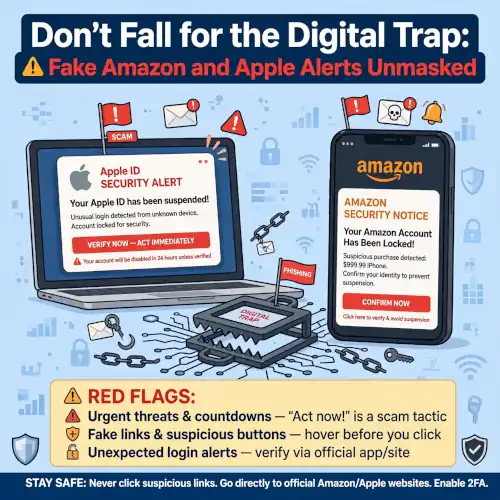

USA Business Today :If a sudden browser pop-up warns you that an unauthorized purchase was charged to your Apple or Amazon account, freeze. Do not panic, do not click, and above all, do not call the phone number on your screen.
Cybercriminals are actively running a fraud scheme designed to exploit brand trust. By impersonating legitimate Apple Support and Amazon Customer Service teams through alarming browser pop-ups, scammers attempt to trick internet users into exposing their personal devices, sensitive credentials, and financial accounts.
Understanding how this fraud operates—and knowing how to react—will keep your digital life and wallet protected.
Anatomy of the Fraud: How the Scam Works
This widespread campaign relies on malicious advertisements, compromised websites, or browser redirects that trigger full-screen pop-ups while you surf the web. The alert usually claims that your Apple ID or Amazon account was just hit with a $149.99 unauthorized charge.
+-------------------------------------------------------------------+
|  [!] URGENT SECURITY ALERT                                        |
|                                                                   |
|  An unauthorized charge of $149.99 via Pre-Authorization was      |
|  detected on your account.                                        |
|                                                                   |
|  Immediate Action Required: Call Support at 1-800-XXX-XXXX        |
+-------------------------------------------------------------------+
Despite carrying different brand colors, logos, and fonts, these pop-ups share an identical underlying mechanics:
-
Believable Dollar Amounts: A charge of $149.99 is large enough to spark instant concern, but moderate enough to sound like a realistic subscription renewal or tech purchase.
-
Technical Jargon: Words like “Pre-Authorization” or “Security Breach Detected” are used to simulate official corporate communications.
-
Manufactured Urgency: Demands like “Call Immediately” or “No Hold Times” aim to short-circuit your critical thinking and force a quick emotional response.
-
A Single Call-to-Action: The pop-up gives you exactly one way to resolve the issue: dialing a telephone number controlled directly by scammers.
What Happens If You Dial the Number?
If you dial the support hotline provided in the pop-up, you will be connected to a live fraudster pretending to be an official security representative. Once on the line, the scammer typically attempts to:
-
Gain Remote Access: They will instruct you to download remote-desktop software (such as AnyDesk or TeamViewer) under the guise of “securing” your machine. This gives them full control over your computer, files, and stored passwords.
-
Steal Account Credentials: They may direct you to a fake verification page (
amazonhelp[dot]supportor a spoofed Apple ID portal) to harvest your login details and two-factor authentication codes. -
Solicit Fraudulent Fees: The scammer might claim that fixing the issue requires a “security protocol fee,” demanding payment via wire transfers, peer-to-peer apps, or gift cards.
How Real Companies Handle Fraud Alerts vs. Fake Pop-Ups
Legitimate tech giants communicate account activity through strictly isolated, authenticated channels.
| Scenario | Legitimate Company Behavior | Fake Fraud Alert Pop-Up |
| Alert Delivery | Push notifications in official app, email, or in-account Message Center. | Web browser pop-up takeover while browsing third-party sites. |
| Contact Method | Directs you to log in on apple.com or amazon.com. |
Demands you dial an unverified phone number immediately. |
| Remote Access | Never asks you to install remote control apps to clear charges. | Demands remote access tools to “clean” or “protect” your device. |
| Security Requests | Never asks for passwords, PINs, or 2FA codes. | Pressures you to disclose account passwords and 2FA codes. |
What to Do When You Encounter a Fake Security Alert
If a browser pop-up locks your screen with a fake fraud alert, follow these steps to clear it safely:
-
Do Not Click Anything: Avoid clicking “OK,” “Cancel,” or any button inside the pop-up.
-
Force-Close Your Browser:
-
Windows: Press
Ctrl + Shift + Escto open Task Manager, select your browser, and click End Task. -
Mac: Press
Cmd + Option + Escto bring up Force Quit, select your browser, and click Force Quit.
-
-
Clear Browser Cache and Cookies: Reopen your browser without restoring previous tabs, then clear your browsing history and cache to remove lingering malicious scripts.
-
Verify Directly: If you are genuinely concerned about an unauthorised charge, navigate directly to
amazon.comorapple.comin a separate window. Check your real Order History or Message Centre. If a charge does not appear in your account dashboard, the pop-up was entirely fake. -
Report the Fraud: Report the incident to official customer support channels or forward details to regulatory anti-fraud databases like the FTC (in the U.S.).