
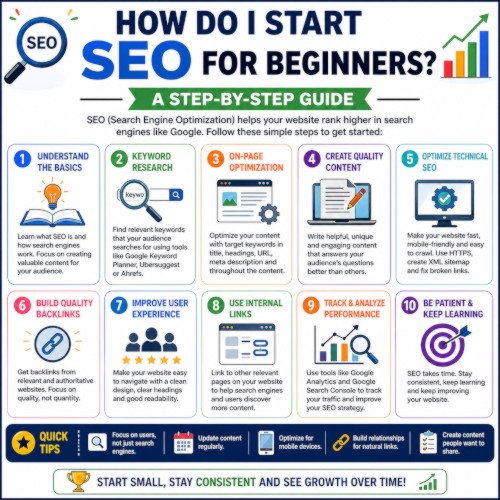

What is seo is nothing but search engine optimisation. Search engine optimisation (SEO) increases a website’s visibility in organic search results by matching site content and technical architecture with user search intent. Beginners can successfully launch an SEO strategy by addressing four fundamental pillars:
| Pillar | Objective | Primary Actions |
| Keyword Research | Identify terms your target audience searches for | Target low-competition, long-tail keywords using free tools like Google Keyword Planner or Google Trends. |
| On-Page SEO | Optimise individual web pages for specific queries | Craft descriptive title tags (under 60 characters), meta descriptions, single H1 headings, and short URL slugs. |
| Technical SEO | Ensure search engine bots can discover and render your site | Connect your domain to Google Search Console, submit an XML sitemap, enforce HTTPS security, and optimise load speed. |
| Off-Page SEO | Build digital trust and site authority | Acquire natural backlinks from reputable sites, list your business in local directories, and promote content across channels. |
5-Step Action Plan for Beginners Search engine optimisation learning
-
Set Up Tracking Tools: Create a free Google Search Console account to monitor indexing issues and keyword rankings. Install Google Analytics 4 to measure website visitor behaviour.
-
Map One Focus Keyword Per Page: Assign a unique target keyword to each page on your website to prevent your own pages from competing against each other in search results.
-
Create Intent-Driven Content: Answer the primary user question directly in the opening paragraph of your page before providing supplementary details, step-by-step instructions, or comparison tables.
-
Implement Internal Linking: Add 2–4 clickable links within your body text pointing to other relevant pages on your website using descriptive anchor text.
-
Optimize Images: Compress large image files to improve page load speed and add descriptive
alttext containing your target terms to enhance visual accessibility and image search rankings.
Internal vs. External Links in SEO and Frequently Asked Questions
-
What is the difference between an internal link and an external link?An internal link connects two pages on the same domain (e.g., linking your homepage to a blog post on your site). An external link (or outbound link) points from your website to a completely different domain (e.g., linking your article to a study on Google Search Central).
-
Why are internal links important for beginners?Internal links create a clear architecture for your site, helping search engine bots discover, crawl, and index new pages efficiently. They also distribute page authority (link equity) throughout your website and keep visitors engaged by guiding them to related content.
-
Does linking to other websites (external links) hurt my own SEO rankings?No. Linking out to high-authority, trustworthy, and topically relevant websites actually signals to search engines that your content is well-researched, credible, and helpful to users.
-
What is anchor text, and how should I write it for links?Anchor text is the visible, clickable text of a hyperlink. Best practices require using concise, descriptive text that tells the reader what the destination page is about (e.g., “read our guide on keyword research“). Avoid generic phrases like “click here” or “learn more.”
-
How many internal and external links should I put on a page?There is no rigid number, but quality and relevance always beat quantity. A good rule of thumb for beginners is including 2 to 5 relevant internal links and 1 to 3 reputable external citations for every 1,000 words of content. Avoid cluttering your text with excessive links.
-
Should external links open in a new tab?Yes. Setting external links to open in a new browser tab (
target="_blank") preserves the user’s session on your website while allowing them to check the external reference separately. Internal links should generally open in the same tab to maintain seamless site navigation. -
What is the difference between a
dofollowandnofollowlink?By default, links aredofollow, which means search engines follow them and pass SEO equity to the target page. Anofollowattribute (rel="nofollow") tells search engines not to associate your site with the target page or pass equity—ideal for affiliate links, paid promotions, or untrusted external resources.